Attach the work product, add versions, and withdraw a mistake.
Attach files
1On the deliverable, under Work product, choose “Attach work product”.
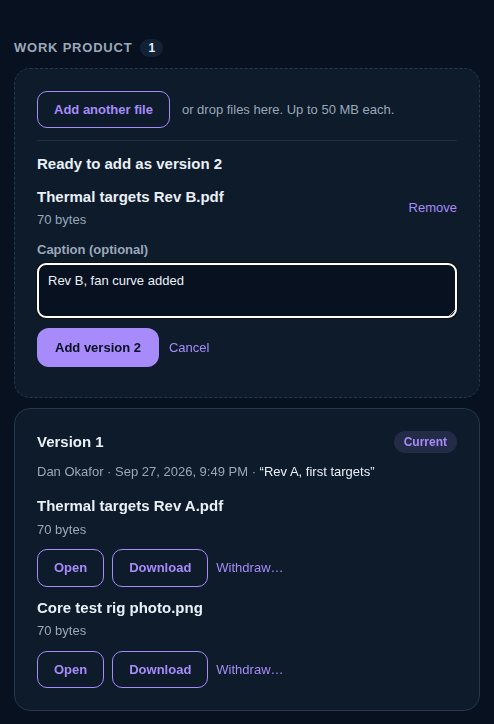
2Pick one or more files. On the web you can also drop them onto the box.
3Add a caption if it helps, such as Rev B, mesh refined.
4Choose “Add version” (it shows the new version's number).
Any kind of file, up to 50 MB each. On iPhone you can also take a photo or pick one from Photos. The owner attaches files, once the work is accepted and until it's verified.
vectorxpro.com/engineer/app
Versions
Every time files are added they become the next version. The newest version is the work product; older ones show as superseded. Nothing is overwritten or deleted, and version numbers are never reused.
Open and download
On the web, “Open” shows a PDF, picture or text file in a new tab, and “Download” saves any file under its own name. On iPhone, tap a file to see it in Quick Look.
Withdraw a mistake
Choose “Withdraw…” on the file (on iPhone, in its … menu) and give a reason. It stays on the record, struck through, with the reason. If every file in a version is withdrawn, the version before it is the work product again. A version that carries a signature is locked: its files can't be withdrawn, and a revision has to be a new version.
Adding a version to submitted work, or withdrawing a file under review, takes it back to In progress. Submit it again for new signatures.

 Engineer