
 Engineer
Who sees what
Everyone on a project sees all of it, because handoffs cross teams. Managers see the projects their people are on, and leadership sees every project.
Help Center / Projects and Teams
Start a project, build its team, and hand work on.
Everyone on a project sees all of it, because handoffs cross teams. Managers see the projects their people are on, and leadership sees every project.
Deliverables are numbered from the code: HX4-01, HX4-02…
On the project's Team, the lead, co-leads, admins and the team members' managers add people, make someone co-lead and take people off. On the web they can also change the lead. Only people with a Vector Engineer seat can join.
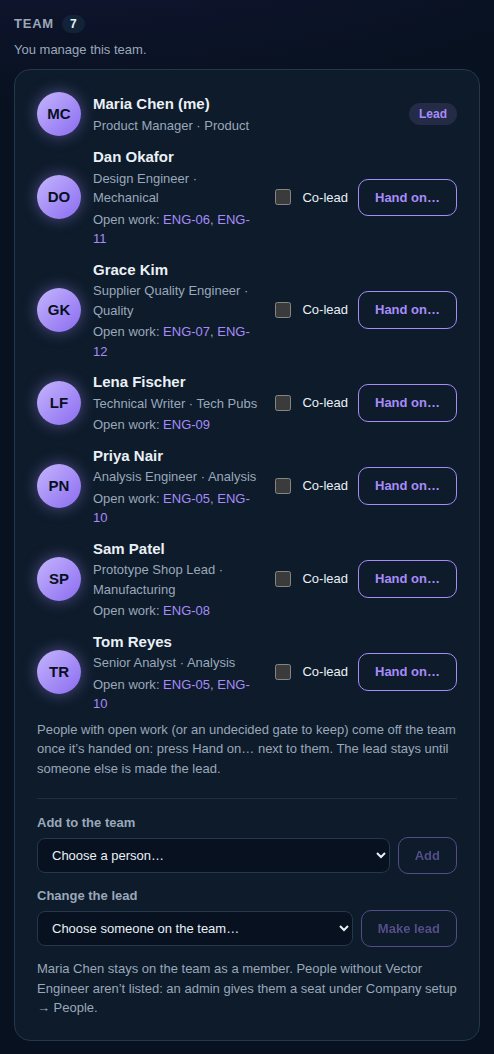
Someone can't come off a team while they owe, sign or answer for open work there, or keep a gate still to be decided. On the web, choose “Hand on…” beside them. Work they own goes to the person you pick, as a request with the same date; you can pick someone different for each piece. Work they sign complete goes to its owner's usual validator. Their technical reviews, gates and outside work go to the person you pick. Then they can come off.
The lead comes off only once someone else is the lead.