Design, FMEA, prototype and drawing reviews: raise what you find, with photos, and see each one fixed and signed off.
Start a review
1Open the project and choose Reviews, then “Start a review” (“+ New review” on the web).
2Pick the kind (design, DFMEA, PFMEA, prototype, drawing or other), give it a name, and pick the gate it reviews against.
3Pick the chair, who sorts the findings, from the team. If you like, pick the work being reviewed: the review records the version it was.
4Add anyone else who is there. The team can always raise findings; someone from outside the team sees this review and nothing else of the project.
Anyone on the team, or a team member's manager, can start a review. A review shows its name, with its number (such as ENG-R3) underneath.
Raise a finding
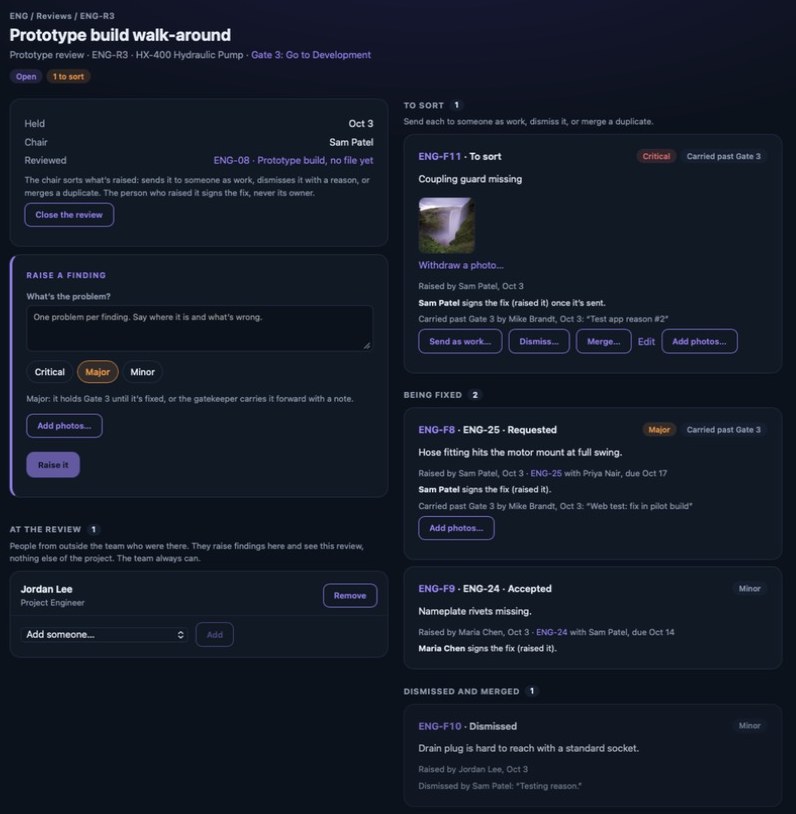
1Open the review and choose “Raise a finding”.
2Say what's wrong, one problem per finding.
3Pick Minor, Major or Critical.
4Add photos: on iPhone take one or choose from Photos; on the web choose “Add photos…”. A caption helps.
5Choose Raise (“Raise it” on the web).
Major and Critical findings hold the review's gate until they're fixed. Minor ones are recorded and worked, but never hold the gate. Photos are never deleted: a wrong one is withdrawn with a reason and stays on the record.
vectorxpro.com/engineer/app
Sort the findings (the chair)
New findings wait under To sort, and the chair sees them on My Work under Findings to sort. The project lead or a co-lead can step in. For each one, send it, dismiss it or merge it. Send it (“Send to…” on iPhone, “Send as work…” on the web) to someone on the team with a date and their working time: it becomes work of kind Finding on the gate, and they accept, propose a date or ask, as with any request. On the web you can also send it to someone outside the company, who gets an emailed link. Dismiss it if it isn't a problem, with a reason. Merge it if it's the same problem as another finding; it then counts once. Nothing is deleted.
The person who raised a finding signs its fix complete, so the one who saw the problem confirms it's gone. If they're not on the team, or they own the fix, the chair signs. Each finding says who signs its fix.
The fix
The work a finding becomes shows a “From finding” card with the problem, its photos, the review it came from and who signs the fix. The owner works it like any deliverable: files, the definition of done, then submit for sign-off. When the fix is verified, the finding shows Fixed.
The gate
A gate's card says how many review findings hold it, and the gate's page lists them under Review findings, each with its severity and a Holds gate tag. The gatekeeper can carry a Major or Critical finding past the gate, with a note (on iPhone, More → “Carry forward past the gate…”; on the web, “Carry it past Gate 3…” on the finding). It stops holding the gate but stays open until it's fixed, and the note stays on the record.
While findings hold a gate, the gatekeeper can still put the project on hold or kill it; Go and Recycle wait.
Change, close and reopen
Until a finding is sent, the person who raised it or the chair can change its words or severity (“Change words or severity…” on iPhone, “Edit” on the web); the change is on the record. The chair closes a review when it's over, which stops new findings; the ones already raised carry on. A closed review can be reopened.
FMEA
The FMEA itself stays in your own file; attach it to the work it belongs to. Bring its recommended actions into Vector as findings at a DFMEA or PFMEA review, so each one gets an owner, a date and a sign-off.
In the reports
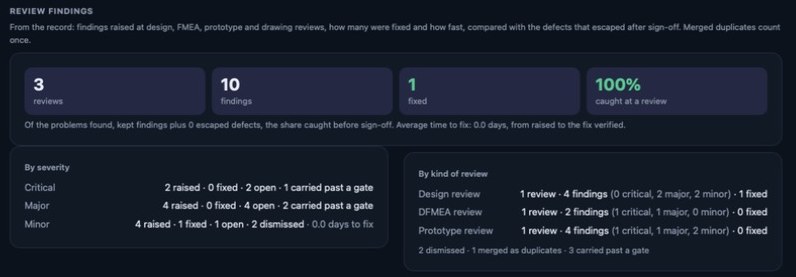
The Gate 6 report and the company report show what the reviews found: findings by kind of review and by severity, how many were fixed and how long a fix took, what was dismissed or carried past a gate, and how much was caught at a review compared with what escaped after sign-off.

 Engineer