
Help Center / Schedule

Schedule

A timeline calculated from promises, with every delay traced.

How the dates are worked out

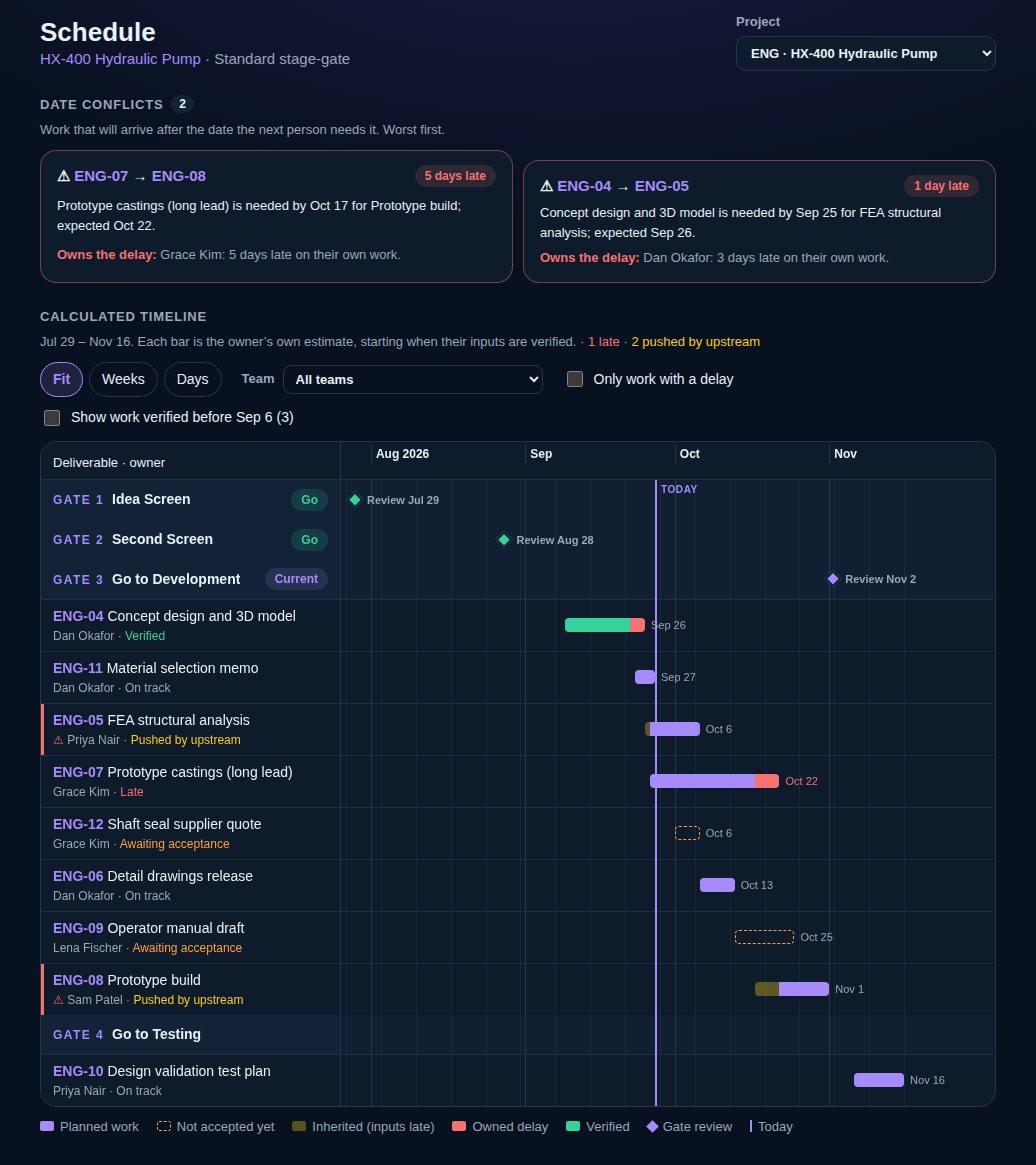
Nobody draws the bars. Each deliverable starts when its inputs are verified and takes its owner's working time. If an input arrives late, the work after it moves by the same days. The forecast finish shows where each piece is heading today.
Inherited and owned days

Every day late is one or the other, never both. Inherited days came from late inputs further up. Owned days are the owner's own, past the date they were held to. Work not started by its planned start counts as owned from today.

Each deliverable's page shows the split, and where the inherited days came from.

Conflicts

A conflict is a link where the work is expected after the date it's needed by. It shows who owns the delay, so the conversation starts in the right place. On the web they're listed above the timeline.

The timeline on the web

On the web the Schedule is a wide Gantt chart: one row per deliverable, grouped by gate, with gate reviews as diamonds and a Today line. Zoom to Fit, Weeks or Days, filter by team or to “Only work with a delay”, and click a bar to open the deliverable.

Work verified long ago is hidden to keep the chart short. Tick “Show work verified before…” to see it.

vectorxpro.com/engineer/app
The Schedule: date conflicts with who owns the delay, and the calculated timeline grouped by gate