
VectorXPro

Help Center / Phases

Phases

How a project's work is grouped, and who changes the phases.

A phase only groups work

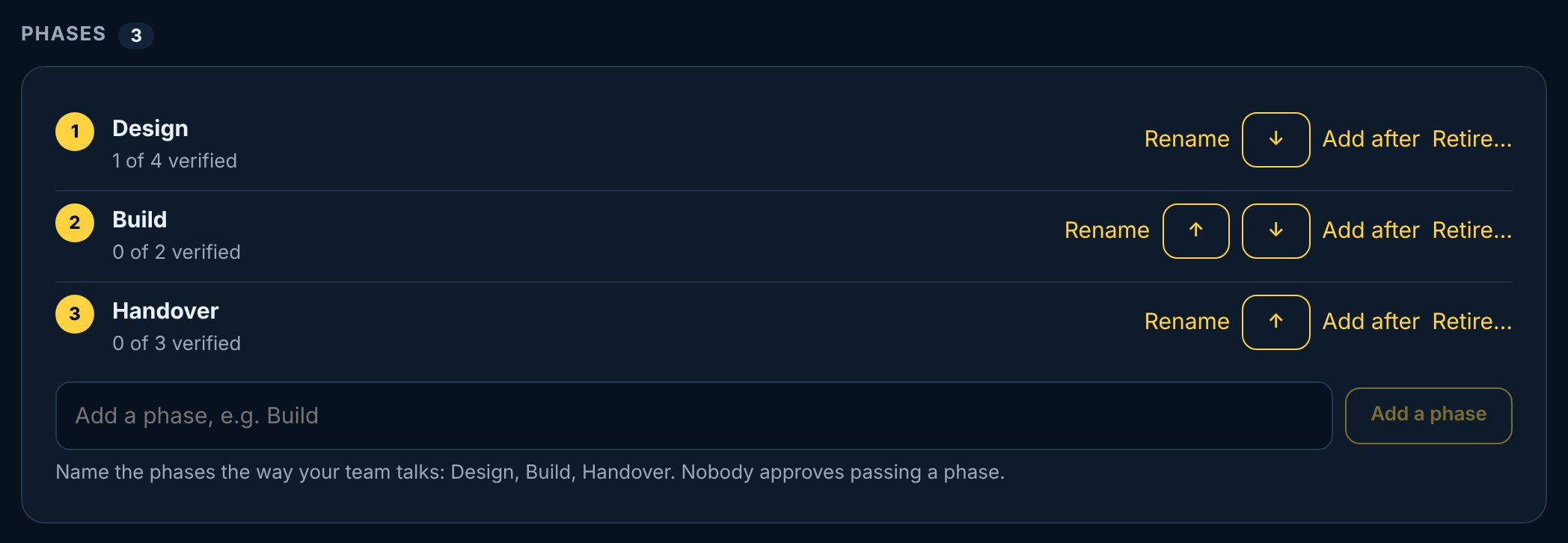
A project's lead names its phases, such as Design, Build and Handover. A phase is a way to group the work: nobody approves passing one, and work in a later phase can start whenever its inputs are ready. Phases are optional. A project can have none, and any piece of work can be Not in a phase.
Change the phases

  1. 1Open the project and scroll to Phases.
  2. 2Tap Add a phase, or a phase's menu to rename it, move it earlier or later, or add one after it.
  3. 3Retire a phase you no longer need, and choose where its work goes: another phase, or Not in a phase.

The lead, co-leads, their managers and company admins change the phases. A retired phase is never deleted; it stays on the record.

vectorxpro.com/project/app
A project's phases: Design, Build and Handover with how much of each is verified, and Rename, Add after and Retire

Move a piece of work

On the work's page, tap its phase to move it. The owner, the person who asked for it, or whoever manages the team can move it.