
VectorXPro
← Back to Vector Workflow

Help Center / Validation

Validation

A fixture buy-off or tool tryout at the bay, with the right people invited.

Set one

  1. 1Open the work order's page once its kit is at a bay.
  2. 2Under Validation, tap “Set a ready date”.
  3. 3Pick the type, the time, how long and where, and add notes for the invitees.
  4. 4Tap “Set it and invite”. The type's usual people are emailed a calendar invitation.
On the day

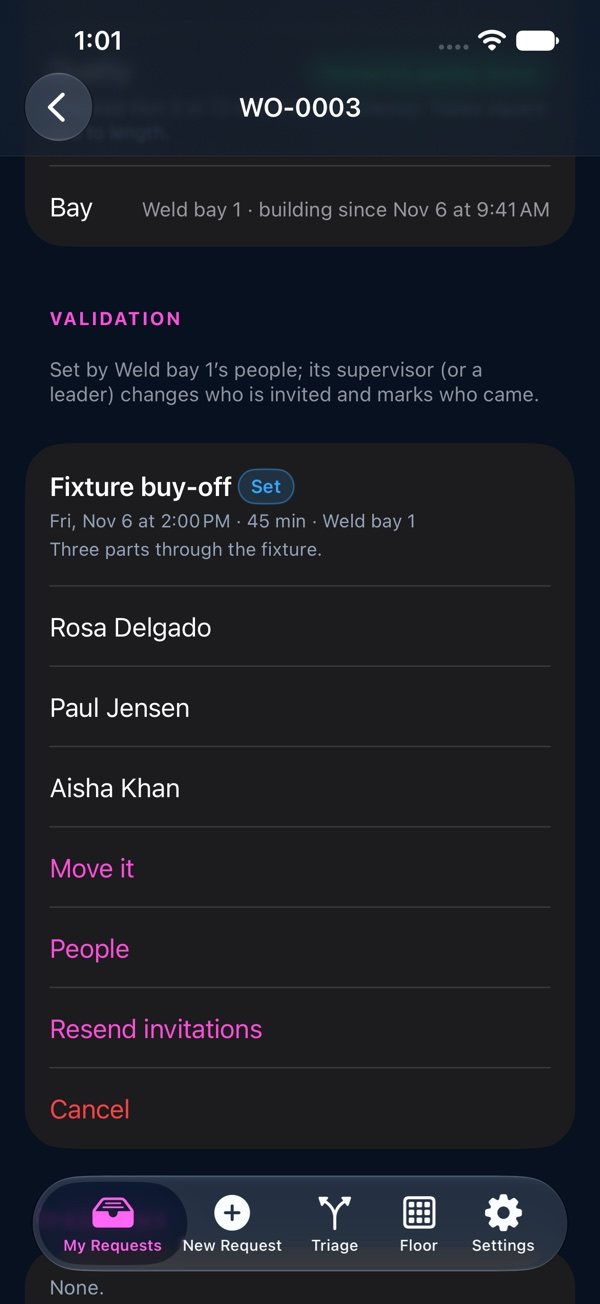
Move it emails everyone the new time. People adds or removes invitees. From half an hour before, the bay's supervisor (or a leader) marks who attended, missed or was excused. Record Passed, or Failed with what failed, which opens a problem on the kit. Cancel needs a reason.

Validation: the fixture buy-off, who was invited, Move it and People