
 Operations Pro

OPERATIONSPRO
Accountability. Clarity. Results.
How to use Vector
Every screen, step by step, on the iPhone. The same Help Center that's in the app under Settings, with pictures.
The loop every item follows
Whether it came from an audit walk or straight from a manager, every item goes round the same five steps.
- Raise itSay what needs attention and where
- Own itGive it to one person, with a due date
- Work itProgress notes and photos as it moves
- Prove itA photo of the fixed condition
- Verify itSomeone confirms it and closes it
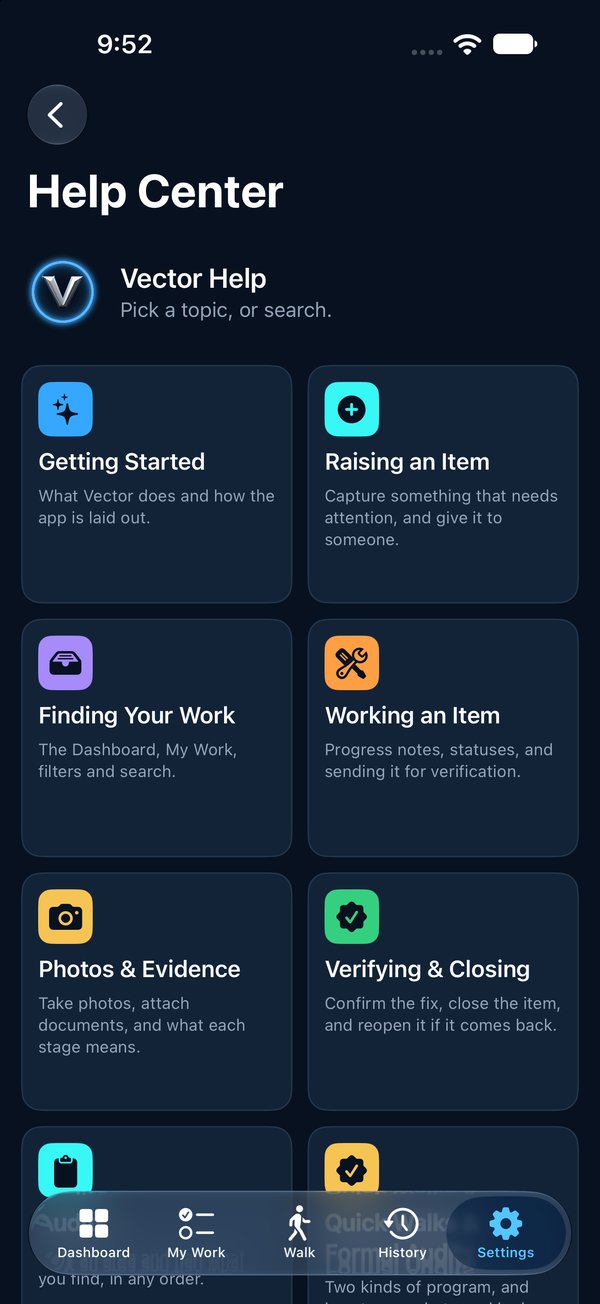
Help Center
Pick a topic, or search.
Getting StartedWhat Vector does and how the app is laid out.Raising an ItemCapture something that needs attention, and give it to someone.Finding Your WorkThe Dashboard, My Work, filters and search.Working an ItemProgress notes, statuses, and sending it for verification.Photos & EvidenceTake photos, attach documents, and what each stage means.Verifying & ClosingConfirm the fix, close the item, reopen it if it comes back, or cancel it.AuditsWalk an area and flag what you find, in any order.Quick Walks & Formal AuditsTwo kinds of program, and how to say what good looks like.Announced AuditsSchedule a Formal audit ahead, tell everyone, and stop if the area isn't ready.Evidence PacksOne document for an item, or for a whole walk.Why You Can Trust the RecordHow Vector shows that nothing was changed after the fact.People & InvitesInvite your team, roles, and signing in.Org Chart, Delegation & EscalationWho reports to whom, handing work on, and what happens when it's late.Programs, Sites & ContactsSet Vector up to fit how your organization works.Your AccountYour password, and deleting your account.
Nothing matches that. Try fewer words, or ask us.
Getting around
Five tabs along the bottom of every screen.
- DashboardShows where things stand across your organization
- My WorkLists what is yours; its + raises an item
- Walk, in the middle, is where you start a walk, join one and flag findings
- HistoryHolds every audit, and the audits announced for later
- SettingsIs your account, your team and this Help Center