How Vector shows that nothing was changed after the fact.
Nothing is quietly changed
Every change to an item, note, photo, walk or finding adds an entry to your organization's record. Each entry carries a fingerprint of what was written and of the entry before it, so changing anything later breaks every fingerprint after it. The app can't edit or remove an entry, and neither can anyone else without it showing.
Intact: every entry carries the fingerprint of the one before it.
Entry 2457c1e✓
Entry 246a3f9✓
Entry 2470d4b✓
Entry 248e82a✓
Entry 2495f07✓
Change entry 247 afterwards, and every fingerprint after it stops matching.
Entry 2457c1e✓
Entry 246a3f9✓
Entry 247edited✕
Entry 248????✕
Entry 249????✕
Photos are fingerprinted too
Before a photo is sent, your phone takes a fingerprint of the picture itself. A photo swapped afterwards no longer matches. Photos from before this was added were fingerprinted by the server from the stored file.
Signed from outside
Once a day, and within a minute of a walk being submitted or an item closed, an independent timestamp authority (DigiCert) signs the newest fingerprint. Anyone can check that signature with standard tools, without trusting Vector.
DigiCert timestamp
Record check: intact through entry 248 outside timestamp 19 Sep 2026, 18:59 UTC (DigiCert)
Every evidence pack carries a line in its header, such as Record check: intact through entry 248 · outside timestamp 19 Sep 2026, 18:59 UTC (DigiCert).
Check the record
Organization admins can check the whole record at any time.
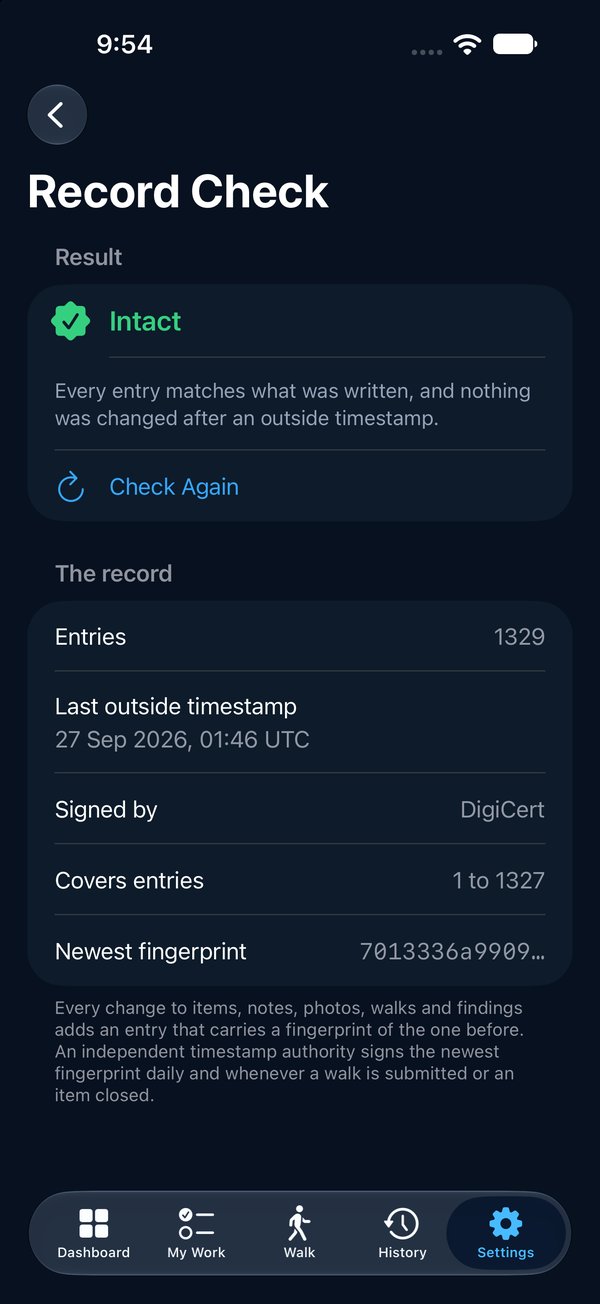
1In Settings, under Organization, tap Record Check.
2Vector checks every entry and shows Intact, or exactly what doesn't match.
3Tap Check Again to run it again.
Nothing in the app can make the check fail. If it ever does, something was changed in the database directly: keep the list and contact Vector support.

 Operations Pro